
The Perils of the Internal Snib on Smart Locks (Secure Lock Explained)
Posted by Mat Steele on 17th Feb 2026
The Perils of the Internal Snib on Smart Locks
Secure Lock Explained — What It Blocks, What It Doesn’t, and Why It Causes Lockouts
Smart locks are sold on convenience — PIN codes, fingerprints, RFID cards, app unlocks and even remote access via Wi-Fi.
But there’s one feature that regularly catches people out because it behaves like an old-school mechanical lock feature, not a “smart” function:
Secure Lock (also called the internal snib or privacy snib).
This article explains what Secure Lock is, what it disables, what it doesn’t disable, and why misunderstanding it is one of the easiest ways to create an unexpected lockout.
What Is Secure Lock (Internal Snib)?
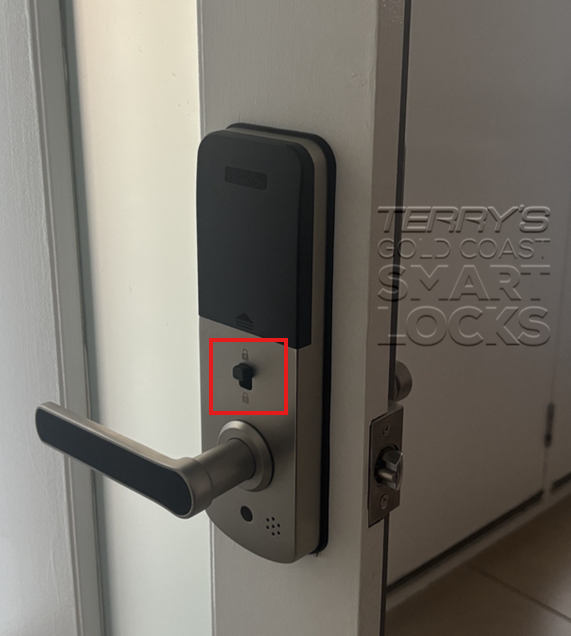
Secure Lock is a physical privacy function activated from the inside of the door.
It is designed to prevent people outside from opening the door using smart credentials.
Think of it like a “do not disturb” mode for your front door — except it’s implemented at the lock hardware level, not just in software.
What Secure Lock Disables
When Secure Lock is engaged, it locks out all digital access methods, including:
- PIN codes
- Fingerprint access
- RFID cards and fobs
- Bluetooth / eKey unlocks
- App unlock commands
- Remote unlocks via Wi-Fi bridge or gateway (where fitted)
What Secure Lock Does Not Disable (This Is the Important Bit)
Secure Lock does NOT lock out the mechanical override key.
If the lock has a key cylinder and someone has a correctly cut mechanical key, that key can still unlock the door even when Secure Lock is engaged.
This is intentional. Mechanical keys remain the ultimate backup for:
- Flat batteries
- Phone issues
- Wi-Fi dropouts
- Emergency access
So while Secure Lock blocks all smart credentials, it does not disable the mechanical key override.
Can the Admin Override Secure Lock in the App?
This is one of the most common questions:
“If someone turns on Secure Lock from inside, can the admin just override it in the app?”
In practice, no — not in the way most people expect.
Admins can manage users (add/remove PINs, issue/revoke eKeys, view logs, etc). But if Secure Lock has been physically engaged at the lock, the lock will refuse digital unlock commands until Secure Lock is disengaged again.
Secure Lock is a hardware-level privacy action. The lock treats it as local priority — meaning the physical snib takes precedence over app commands.
The Real-World Perils of Secure Lock
“My codes stopped working”
The most common call we get is a lock that suddenly won’t accept PINs, RFID, fingerprint, or app unlock. Secure Lock is often the culprit.
Remote access becomes irrelevant
Even with a Wi-Fi bridge fitted, Secure Lock can block remote unlock commands. The lock will show as reachable, but it won’t open.
Accidental lockouts
A family member can engage the snib without understanding what it does. Then nobody outside can enter using smart credentials — only someone with the mechanical key can.
Security assumptions change
People often assume “Secure Lock = nobody gets in”. That’s not accurate if mechanical keys exist and are in circulation.
Best Practice (Avoid the Headaches)
- Teach the household what Secure Lock does (and how to turn it off).
- Keep mechanical key control tight — if keys are out there, Secure Lock won’t stop them.
- Don’t rely on remote unlock as your only recovery plan if Secure Lock might be used.
- Use Secure Lock intentionally (privacy / lockout mode), not as an everyday locking habit.
Frequently Asked Questions
Does Secure Lock stop fingerprints, RFID and app unlock?
Yes. Secure Lock locks out digital credentials including fingerprints, RFID, PIN codes, eKeys and app unlock commands.
Does Secure Lock stop the mechanical key?
No. A correctly cut mechanical key can still unlock the door.
Can an admin override Secure Lock?
Generally no. If physically engaged, the lock refuses digital commands until disengaged locally.
What should I do if I’m locked out?
Use the mechanical key if available, or have someone inside disengage Secure Lock. Otherwise, you may require a locksmith.
Need advice?
If you’re unsure which lock model you have or how Secure Lock behaves on your setup, you can ask our expert team here and we’ll clarify before you buy or modify your door.